Day 5/100 in #100DaysOfDesign: Power of Design Thinking - My Top 10 Tools
(Why) - An Introduction to My Deepening Appreciation for Design Thinking ✍️ On Day 5 of my #100DaysOfDesign journey, I want to highlight the incredible impact of Design Thinking in my design process. This approach has been a crucial part of my toolki...
(Why) - An Introduction to My Deepening Appreciation for Design Thinking
✍️ On Day 5 of my #100DaysOfDesign journey, I want to highlight the incredible impact of Design Thinking in my design process. This approach has been a crucial part of my toolkit for a while, and I'm excited to share its significance in my journey.
(What) - Embracing the Transformative Potential of Design Thinking
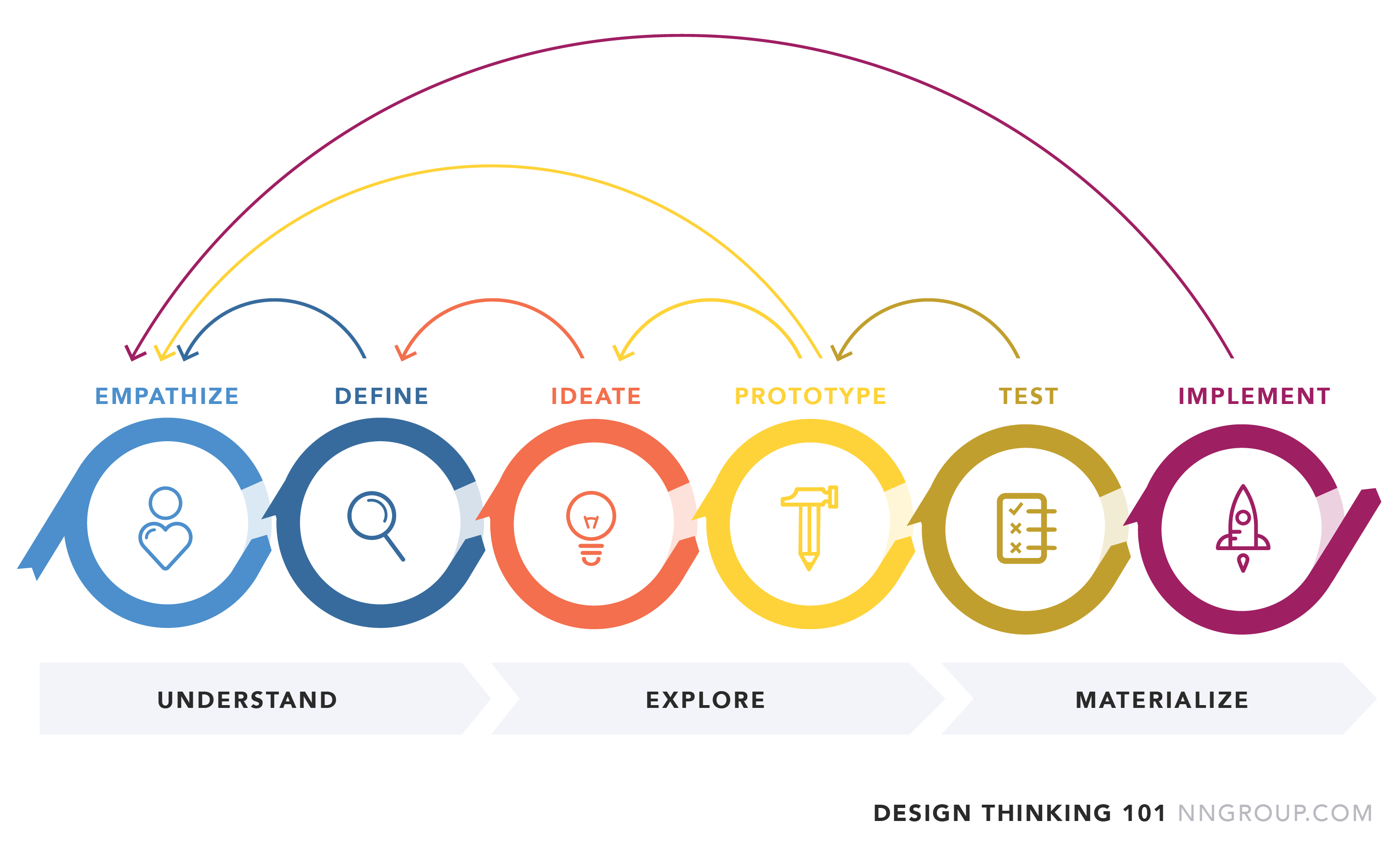
✍️ Design Thinking is not just a process; it's a mindset that fuels innovation. It's about empathizing with users, defining problems, ideating solutions, prototyping, and testing. What's fascinating is how it encourages collaboration and out-of-the-box thinking, which is why it has become such an integral part of my design process.
One of the aspects I appreciate most about Design Thinking is its iterative nature. It doesn't follow a rigid path but welcomes experimentation and learning from failures. As someone who values user-centric design, it aligns perfectly with my approach.
(How) - How Design Thinking Continues to Elevate My Work
🖼️ My journey with Design Thinking has been transformative. It has refined my ability to put users at the heart of every design decision. As I work through my #100DaysOfDesign challenge, Design Thinking is a cornerstone of my creative process, guiding me toward more meaningful and effective solutions.
Now, let's explore my top 10 Design Thinking tools, carefully curated for each phase of the Design Thinking process:
Empathize: User Interviews, Hotjar & Persona Creator,
Define: Miro, Trello & FigJam (Information Architecture)
Ideate: Figma, Notion, Github Project Management & Mural
Prototype: Figma, Adobe XD & Sketch
Test: Google Optimize, Optimizely & Adobe Target
These tools have been invaluable in my Design Thinking journey. If you're interested in exploring more Design Thinking tools, check out the top 10 tools I recommend in this article.
I share this not as a novice but as an advocate who recognizes the immense value Design Thinking brings to design. It's a reminder that adopting a human-centric, iterative approach can yield remarkable results in our quest for excellence. To read more about design thinking I'd recommend Nielsen Normal group https://www.nngroup.com/articles/design-thinking/
Stay tuned for more insights, discoveries, and design innovations as I continue to explore the world of design and user experience, championing the power of Design Thinking.
Social Proof
✍️ To showcase my commitment to growth, I shared my journey on LinkedIn.